
Creating Voice-Over Ducking Effects for Tracks
The ducking feature enables you to combine spoken content with music in such as way that, on playback, while the voice is more prominent and perceived by the listeners as being in the foreground, the music is playing at a lower level (in the background).
Prerequisite
You have two audio tracks, a music track and a voice-over track. You want to attenuate the level of one of the tracks (the music) whenever a signal is present on the other track (the voice recording).
Procedure
- Select the carrier track, that is, the track containing the music.
- In the track control area of the carrier track, activate Ducker On/Off.
-
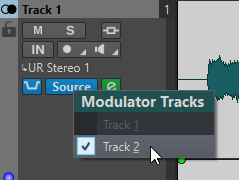
Click Source to open the Modulator Tracks menu, and select one or multiple modulator tracks, that is, the tracks containing the voice recording.
-
Play back the audio montage.
The volume of the music track is lowered every time the voice track emits a signal.
- Optional: Click Ducker Settings to open the Ducker plug-in, and adjust the settings to fine-tune the ducking effect.
- Optional: If you are using multiple modulator tracks, you can also apply ducking to modulator tracks.