
User Interface
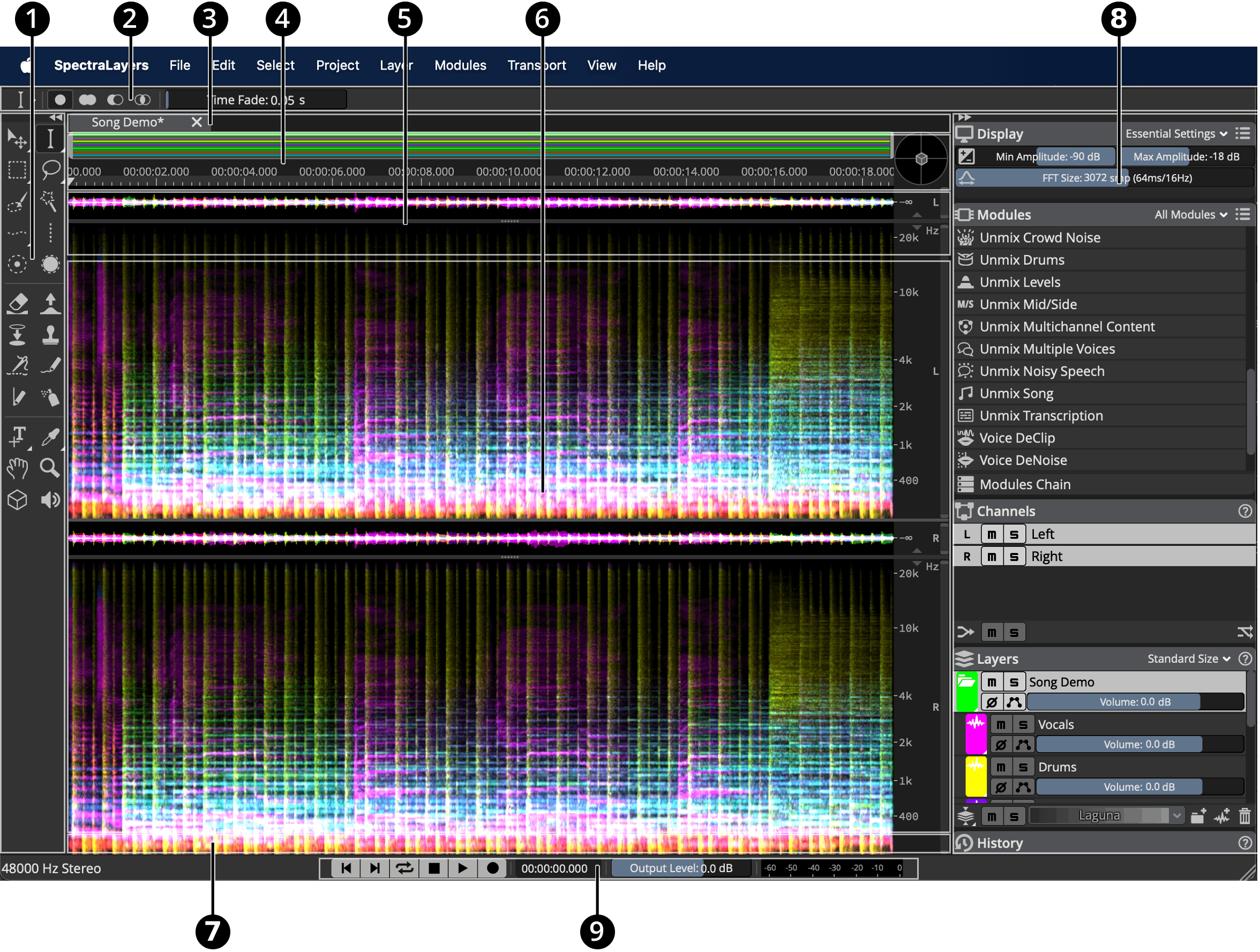
At the top of the interface the Menu Bar controls project handling, selection editing, processing and unmixing, layer management and other interface and project aspects.
-
The Tools Area provides transforms, selections, modifications, drawings, measurements, and navigation tools that can be used in the Spectral Display.
-
The Tool Settings show the parameters of the currently active tool.
-
The Project Tabs manage the different projects of your session.
-
The Overview Bar, Timeline and 3D Pad Area display a schematic view of your project and help you navigate.
-
The Waveform Display shows the layers amplitude.
-
The Spectral Display lets you visualize and edit the layers spectrogram.
-
The Transcript Bar displays and let you adjust layers transcription.
-
The Panels Area shows display settings, editing history, audio channels, and layers list.
-
The Transport Area provides access to transport commands, playhead position, output level and VU Meter.