
History Panel
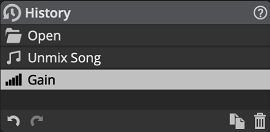
Move back in time with your edits, by selecting the latest event you want to restore.
Double-clicking an event allows you to rename it.
Similar events happening in a short time frame are merged automatically. This can be tweaked in the System Preferences.
Clicking the previous action or the  Undo button is equivalent to clicking or pressing Ctrl+Z (Windows) Cmd+Z (macOS)
Clicking the next action or the
 Redo button is equivalent to clicking or pressing Ctrl+Y (Windows) Cmd+Shift+Z (macOS)
The
 Duplicate Project button is equivalent to clicking . See Project Management.
The  Delete Current State button will undo the current action, remove it and any action after it.
The  Include Selection Events button sets whether selection changes are recorded in the history. When it is off, you can change selections without adding history events, and undo and redo leave the current selection as is. This is the same setting as Include Selection Events in the System Preferences.