
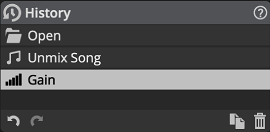
Move back in time with your edits, by selecting the latest event you want to restore.
Double-clicking an event allows you to rename it.
Similar events happening in a short time frame are merged automatically. This can be tweaked in the System Preferences.
Clicking the previous action or the  Undo button is equivalent to clicking › or pressing Ctrl+Z (Windows) Cmd+Z (macOS)
Clicking the next action or the
Undo button is equivalent to clicking › or pressing Ctrl+Z (Windows) Cmd+Z (macOS)
Clicking the next action or the  Redo button is equivalent to clicking › or pressing Ctrl+Y (Windows) Cmd+Shift+Z (macOS)
The
Redo button is equivalent to clicking › or pressing Ctrl+Y (Windows) Cmd+Shift+Z (macOS)
The  Duplicate Project button is equivalent to clicking › . See Project Management.
The  Delete Current State button will undo the current action, remove it and any action after it.
![[Note]](skin/admon/note.png) |
Note |
|---|---|
|
You can disable selection events from History in the System Preferences. |
